








Today, we're releasing Search Toolkit in public preview. Search Toolkit is a composable framework for building production search pipelines for AI applications. We built it because teams building search infrastructure still spend too much engineering time on plumbing. Most stitch together separate tools for ingestion, retrieval, and evaluation, each with its own interface and its own assumptions about data. Search Toolkit brings all three into a single framework with a shared interface, so teams spend their time improving search quality instead of maintaining integrations. Search Toolkit is open source and runs wherever your infrastructure does. Cloud, on-premises, edge.
Search infrastructure is still harder than it should be.
Most teams building retrieval systems spend more time assembling infrastructure than improving search quality. Ingestion requires one set of tools. Retrieval requires another. Evaluation, if it happens at all, is bolted on with a separate framework and separate assumptions about data shape.
Teams report weeks of integration work before they can run a single query against their own data. Measuring whether the retriever is returning the right results often requires yet another toolchain. For organisations building RAG workflows or internal knowledge systems, that overhead multiplies at every layer.
Where it fits.
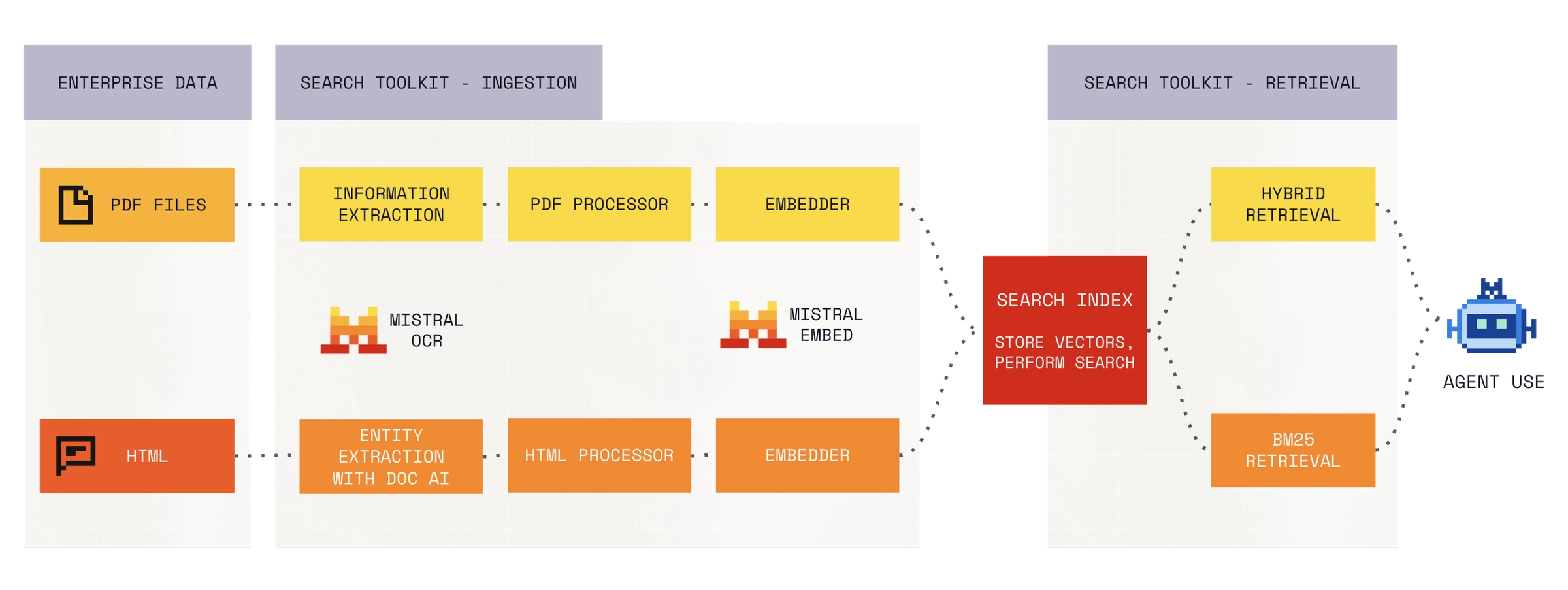
Enterprise search. Most organisations don't have a search problem. They have a dozen search problems. Internal wikis, support ticket systems, document repositories, file storage, codebases. Each source has different structure, different metadata, and needs different processing to index well. Teams typically end up building a separate ingestion pipeline for each one, with its own parsing logic, its own chunking strategy, and its own assumptions about what a "document" looks like. The result is a set of isolated indexes that can't be searched together, or a brittle custom layer that tries to unify them and becomes its own maintenance burden. Search Toolkit provides consistent processing and indexing patterns across source types within a single framework, so teams add new sources without rebuilding the pipeline each time.
RAG and retrieval quality. When a RAG system returns poor results, the first question is whether the problem is retrieval or generation. In practice, most teams have no clean way to answer that. They tweak prompts, adjust chunking strategies, and swap models without knowing whether the retriever is surfacing the right context in the first place. And even teams that do focus on retrieval often lack the tooling to compare strategies rigorously, on their own data, with their own relevance judgments. The alternative is writing custom evaluation scripts for each experiment. Search Toolkit includes built-in evaluation that measures retriever performance independently, so you can isolate retrieval quality from generation quality and compare configurations as your corpus evolves.
Domain-specific retrieval. Legal filings, medical records, codebases, financial disclosures. Off-the-shelf retrievers are trained on general-purpose text and tend to struggle with specialised terminology, document structures, and relevance criteria that differ from web search. Teams that need domain-tuned retrieval often end up building custom retrieval infrastructure from scratch, which is expensive to maintain and hard to evaluate.
Search in an agentic world
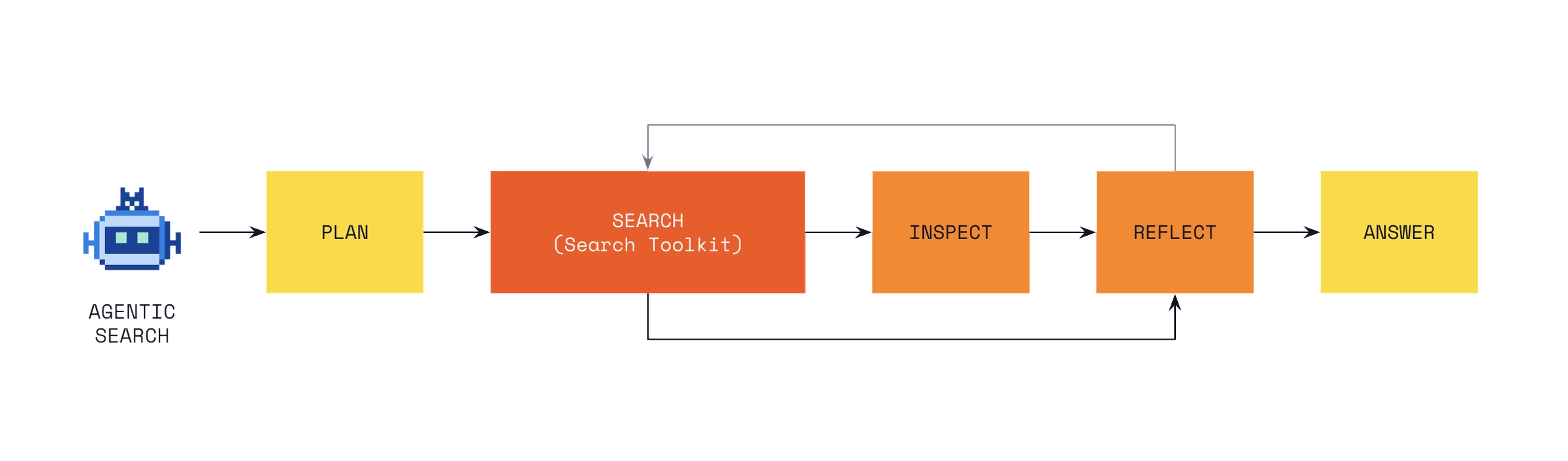
Agents working on enterprise tasks need access to enterprise context. They make retrieval decisions autonomously and at high volume, so the quality of the search infrastructure underneath them directly affects every downstream step. For searching across large document corpora, agents perform semantic search on an index, which gives them precise results at low latency.
Agents also need live data. With Connectors, they pull directly from source systems like CRMs, code repositories, and productivity tools through MCP integrations. An agent can query an indexed corpus when it needs to search across a large body of content, and pull live data from a source system when it needs the latest state. Search Toolkit gives your agents a high-quality indexed search path to call on alongside live retrieval.
What's inside.
Ingestion. Index and process data from multiple sources with configurable pipelines. Search Toolkit handles document parsing, chunking, and embedding generation. Custom document formats and preprocessing steps plug in through a standard adapter interface.
Retrieval. Search Toolkit ships with BM25 sparse retrieval, dense embedding-based retrieval, and hybrid configurations that combine both. Each is configurable to your data and use case.
Evaluation. Measure search quality with built-in metrics: recall, precision, MRR, and NDCG. Run evaluations against your own test sets, compare retriever configurations side by side, and track quality across releases.
All modules share a common configuration interface. Replace your indexer, swap your retriever, add an evaluator. The rest of the pipeline adapts.
Search Toolkit has been designed for advanced use cases for the enterprise, and battle tested across financial services, manufacturing, public sector, and media & entertainment verticals. CMA CGM uses Search Toolkit alongside Voxtral to help journalists detect fake news. The pipeline processes audio from three distinct data sources and returns alerts within 15 seconds end to end.
Watch the demo
Get started.
The fastest way to try Search Toolkit is with our starter app template.
Prerequisites
Install Docker. You also need uv in the generated project.
Scaffold a new project
uvx copier copy gh:mistralai/search-starter-app my-search-projectcd my-search-projectRun it
# Start Vespa locally with Dockermake setup-vespa# Index sample datamake ingest path=sample_data/hello.txt# Run a querymake search query="hello world"The template includes:
Pre-configured Vespa indexing
Hybrid retrieval (BM25 + vector)
Sample data and ingestion pipeline
For full details, see the starter app README.
What’s next
Once you’ve tried the starter app, dive deeper:
Tune your ingestion pipeline – Configure parsers, chunking strategies, embedding models, and extractors for specific file types to handle your data sources.
Manage Vespa schema & relevance – Optimize indexing and ranking profiles for your use case.
Build your dream retrieval – Leverage advanced features like LLM query rewriting, reranking, and hybrid retrieval.
For the full reference, see the Search Toolkit documentation.